
0
$0
0 items
A common challenge when working with WooCommerce is setting up a wholesale store. While WooCommerce is a powerful and very flexible tool, it is designed and geared towards retail stores. As a result, it's missing a lot of important wholesale features such as wholesale prices, quantity discounts, minimum orders, invoices, box quantities, quote requests, hiding prices, etc.
To implement wholesale functionality, there are a few different routes you can take. First of all, custom coding is always an option. Since WooCommerce is very flexible, all of the above can be implemented through custom code or by modifying existing plugins or themes.
However, the easiest way to set up a wholesale or B2B store with WooCommerce is to use a dedicated wholesale plugin.
We recommend taking a look at the B2BKing B2B and Wholesale Plugin: With over 137 features and options, it is designed to be a complete wholesale solution with everything you need to set up a wholesale store.

Another common necessity in a B2B environment is having dedicated sales agents or reps to help make sales, stay in touch with important customers, manage orders, or place orders on behalf of customers. For that purpose, B2BKing also works perfectly together with the SalesKing Sales Agents & Reps Plugin.
Finally, you may want to set up a multi-vendor marketplace where multiple companies can sign up and start selling their products to both retail and business customers. In that case, B2BKing works perfectly together with the MarketKing multi-vendor plugin.
Let's take a look at the most important functions and challenges of a wholesale setup.
Since prices can be sensitive and subject to negotiation, you may want to show them only to logged-in, pre-approved users. This can easily be done with B2BKing, and customers will be prompted to log in to view prices.

Wholesale prices, discounts, and customer-specific pricing can also be configured so that each customer sees only the specific price you want them to see.
There are a few different ways to configure wholesale prices. One way is to directly enter a different price for each product on the product backend.

For example, in the image above, the regular price (for B2C customers) is $29, while the price for wholesale buyers is $19 for this specific product.
These pricing options can also be configured in bulk for all products at once.

For example, in the screenshot above, we have a "discount rule" that gives B2B buyers 25% off on all products. When such a rule is set up, B2B buyers will see the price as discounted:

An important feature when setting up a wholesale store with WooCommerce is offering progressively better prices as customers purchase higher quantities (quantity discounts).
For example, here we can see how the discount increases to 10%, 20%, and 30% as the quantity purchased goes up:
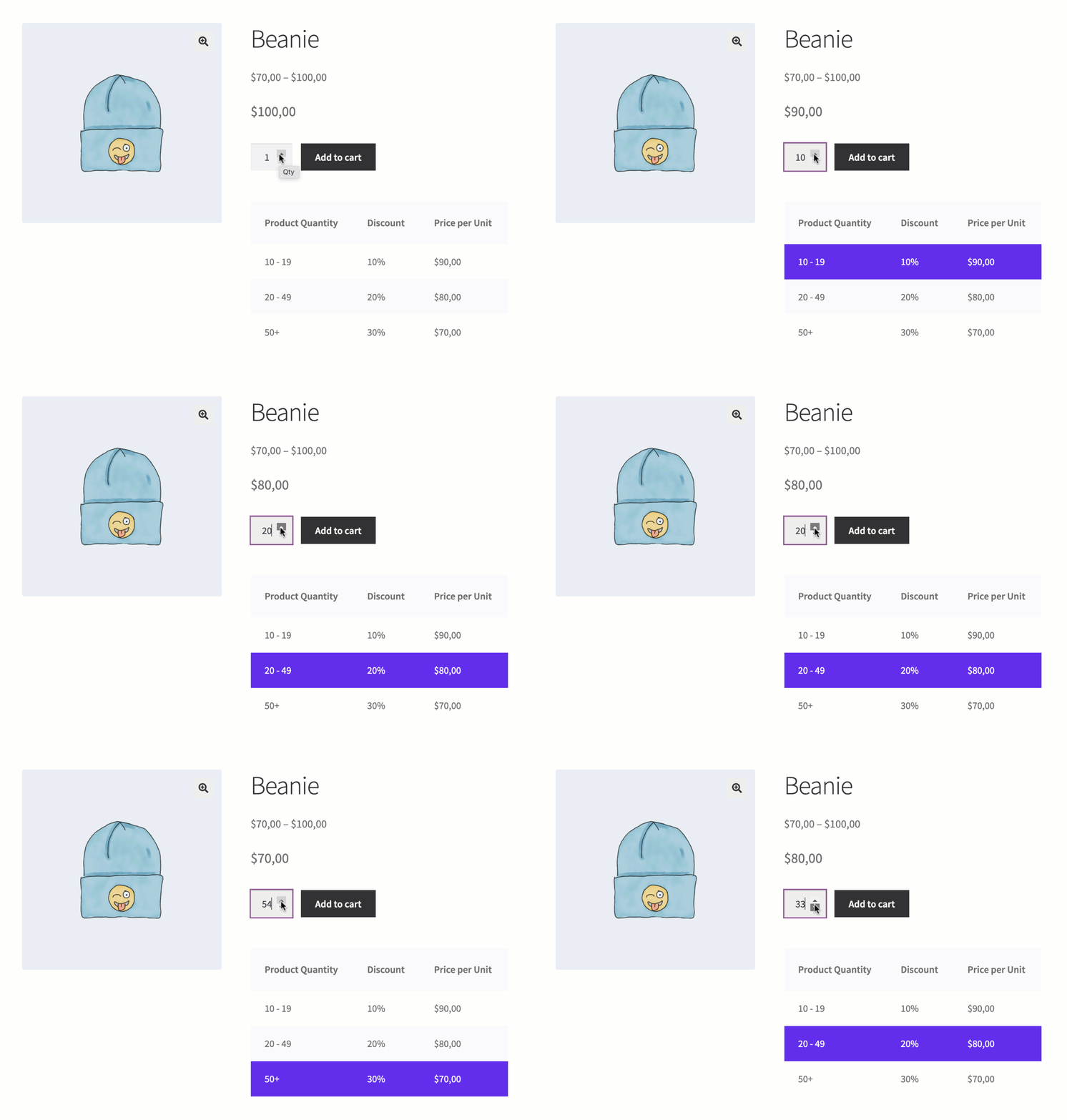
These discounts and price tables can also be configured in bulk for all products at once (e.g. offer a 5% discount for 10+ items, 10% off for 20+ items, etc.) through "Tiered Pricing" rules.
You may also want to set minimum order rules for specific products or for orders in general. Here are just a few examples of what can be achieved with B2BKing's minimum order rules:
The plugin also offers "Quantity Step (Carton Quantity)" rules. With these, you can configure a box quantity and force customers to purchase in multiples of that quantity. For example:
These rules are highly flexible and can be applied to specific products, specific product categories, user groups, or specific users in any combination.
An important feature for wholesale shops is offering a customized user registration process. With B2BKing's registration feature, you can create and choose from 9 types of custom registration fields to build a powerful setup.
For example, you can request information and documents, and require specific fields for buyers to complete their registration.
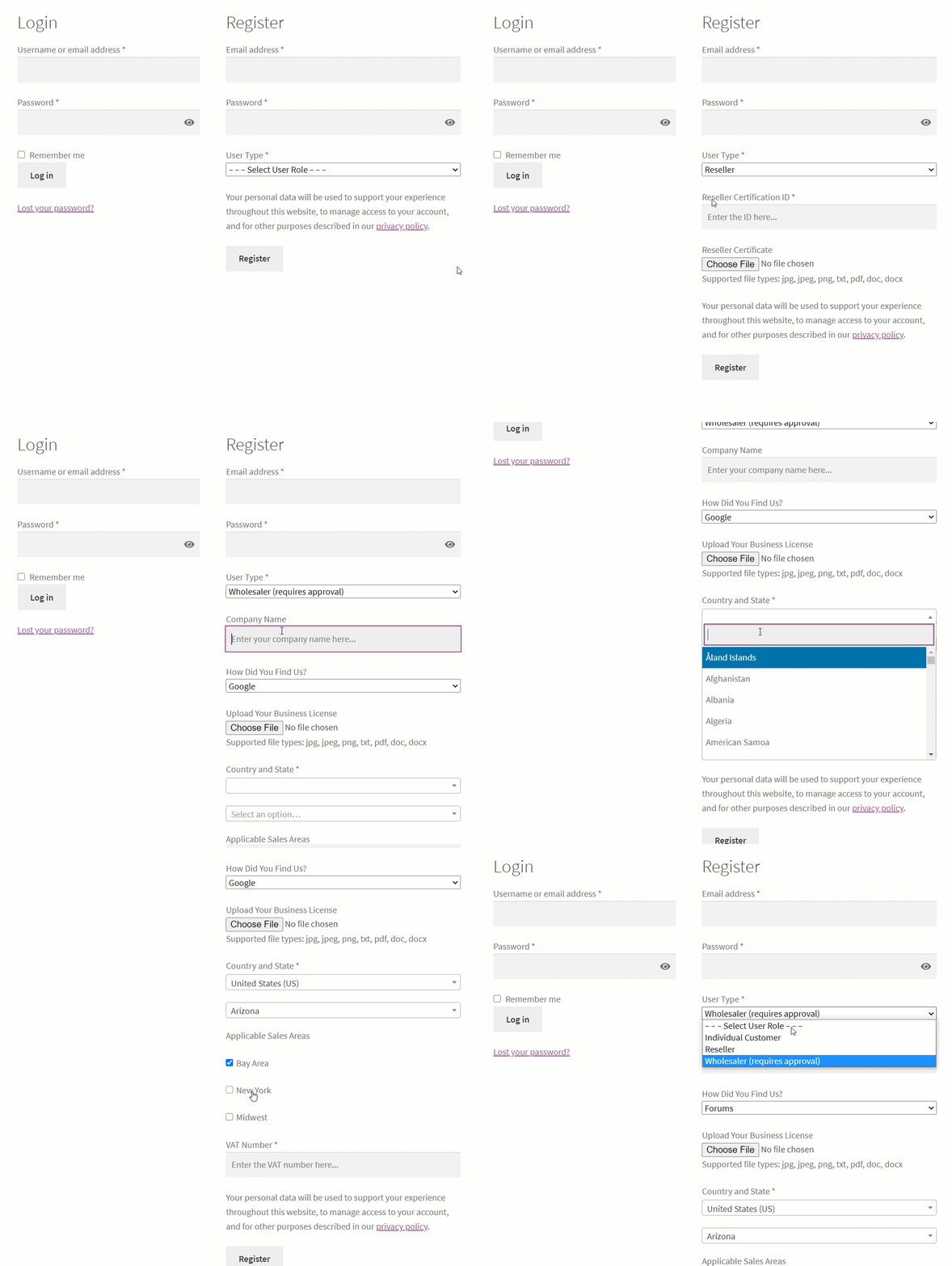
You can also set up a manual approval process, where buyers must be reviewed and approved before they can log in and access the shop.
A common requirement for wholesale stores is allowing customers to order without paying immediately and then issuing an invoice (e.g. Net 30 or Net 60 terms).
B2BKing's invoice payment gateway is ideal for this purpose and allows buyers to choose the invoice option during checkout. Additionally, the plugin can control which users have access to which payment methods. So if you have a mixed B2B + B2C store, you can choose to enable the invoice option only for approved B2B buyers.

Sometimes customers may have specific requirements or may be looking to get custom terms depending on their needs. For those situations, B2BKing has a flexible quote request system that you can enable.
Products can be added to a quote request, which is then sent to the shop admin.

You can then make an offer, specify a price per unit, and send customers a PDF document branded with your company logo.

Buyers can then purchase the offer or continue to negotiate.
We mentioned hiding prices for products, but beyond that, products can even be hidden completely. Specific products or categories can be shown to specific users or user groups only. This provides a lot of flexibility and allows WooCommerce wholesale stores to provide a unique product catalog for each buyer.
Wholesale buyers are often looking for a quick way to browse the entire product catalog or to search for specific products or SKUs.
Built exactly for this purpose, B2BKing offers a stylish order form (with 3 built-in themes/designs). Through this form, buyers can scroll through your catalog, view options, and quickly add products to cart in bulk.
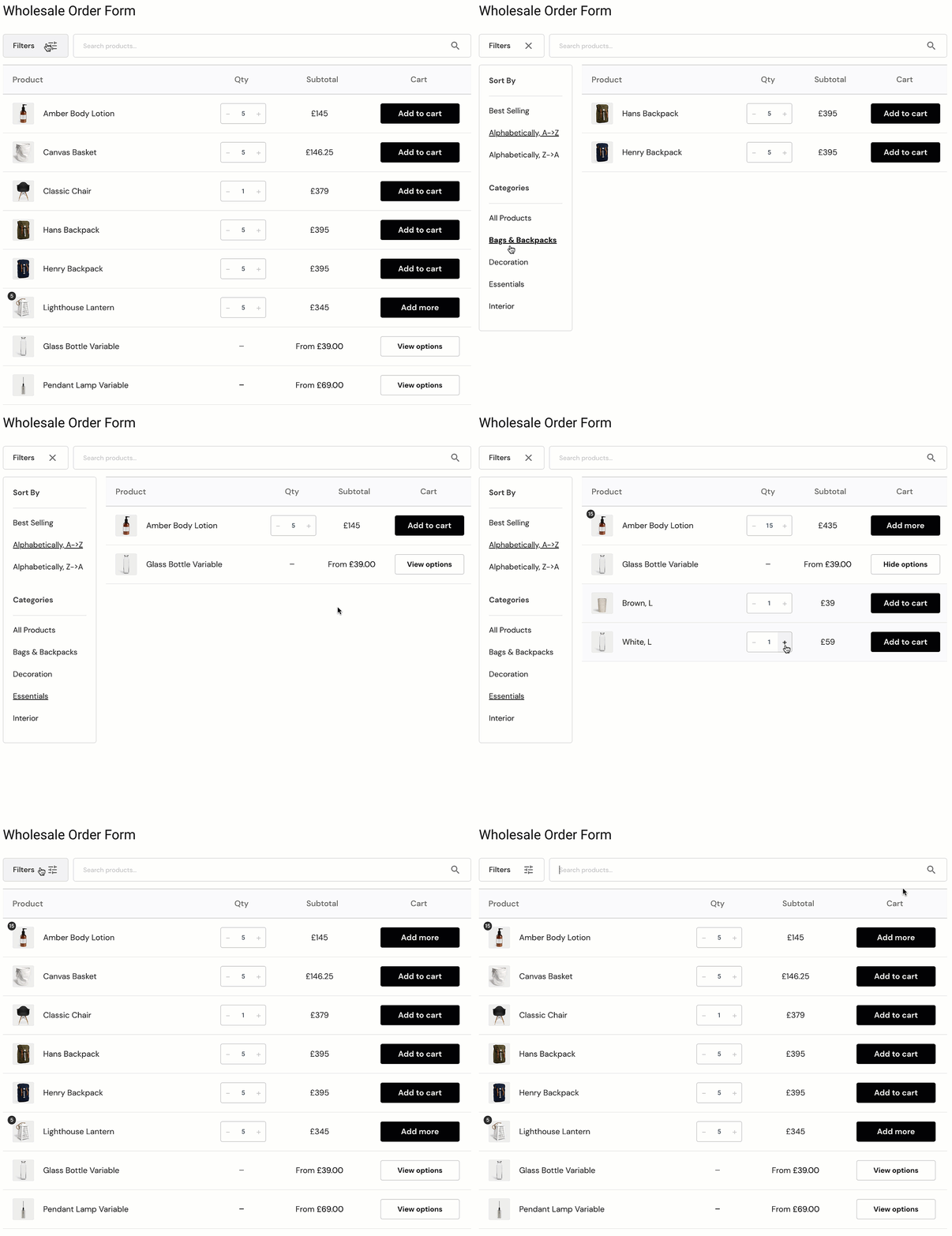
This order form is fully integrated with other plugin features. For example, if you have hidden a product from a specific user, that product will also be hidden from the order form.
An essential part of selling to businesses and wholesalers is complying with tax requirements and enabling tax exemptions when appropriate. B2BKing has a tax exemption feature that allows, among other things:
With this feature, you can control for each user group, and even for each individual user, which shipping and payment methods they have access to.
For example, you can enable the "Bank Transfer" method for B2B users only.
Payment Method Discounts and Surcharges
Through special rules, you can offer a discount or charge a surcharge when using specific payment methods. For example:
Payment Method Minimum/Maximum Orders
You can also require a minimum order amount to pay with a specific method. For example:
In this article, we looked at a few important features for wholesale shops, but there is so much more!
B2BKing offers many additional options such as offering a line of credit to your customers, enabling shopping lists, messaging and negotiation (message system), free shipping rules, purchase orders, and more.
B2BKing is also ideal for both B2B-only stores and B2B+B2C hybrid stores. The plugin has 2 separate modes, one for each situation.

