
0
$0
0 items
If you are looking for a complete suite of wholesale tools for your WooCommerce store, you are in the right place. B2BKing combines over 137 features and functionalities into a single plugin, making it suitable for any store that wants to add wholesale capabilities to an existing setup or build a dedicated B2B operation from scratch.
While there is no shortage of wholesale plugins for WooCommerce, what sets B2BKing apart is not just the breadth of its feature set but how those features connect to one another.
Wholesale commerce involves a different customer journey than retail, and the plugin is designed around that journey end to end: from custom registration forms and approval workflows, through restricted catalogs and tiered pricing, into bulk ordering tools and checkout rules, and finally into post-purchase functionality like reordering, company credit, and quote negotiation.
This article walks through the entire flow from start to finish, showing how each piece fits together.
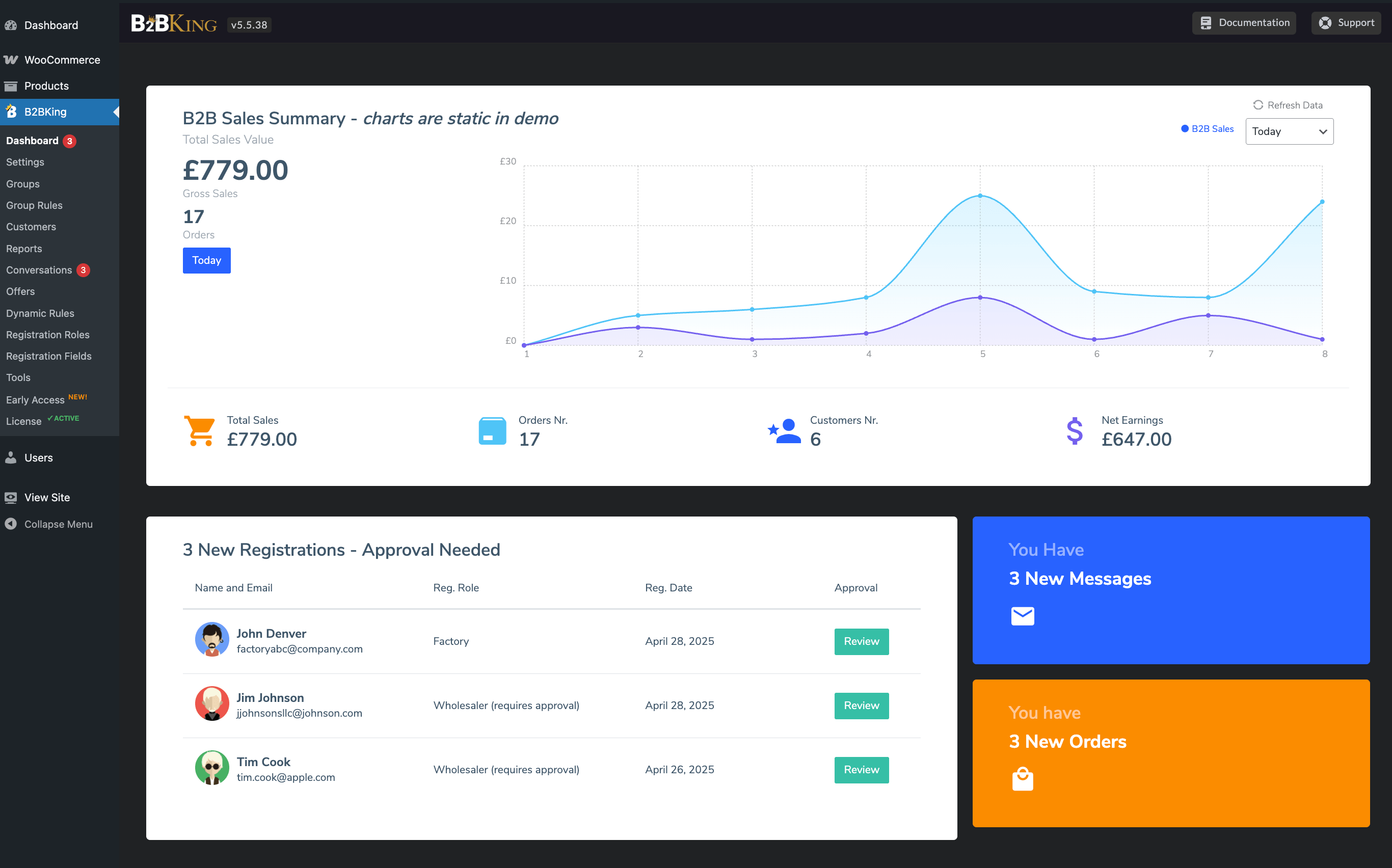
The first touchpoint for any new wholesale buyer is registration, and it is also where B2B requirements diverge most clearly from retail. A standard WooCommerce signup form asks for an email and a password. A wholesale buyer typically needs to provide much more: a company name, a VAT or tax ID, a resale certificate, a business license, contact details for accounts payable, and so on.
B2BKing replaces or supplements the default registration with a dedicated B2B form that supports custom fields using more than nine field types, including text inputs, dropdowns, checkboxes, radio buttons, date pickers, and file uploads. The file upload field is particularly useful for collecting verification documents such as tax exemption certificates or trade licenses.
Two registration paths can run side by side. A B2C form can stay simple and frictionless for retail buyers, while a separate B2B form gathers the information you actually need to vet a wholesale account. From there, an entire suite of wholesale tools can apply distinctly to B2B buyers only.
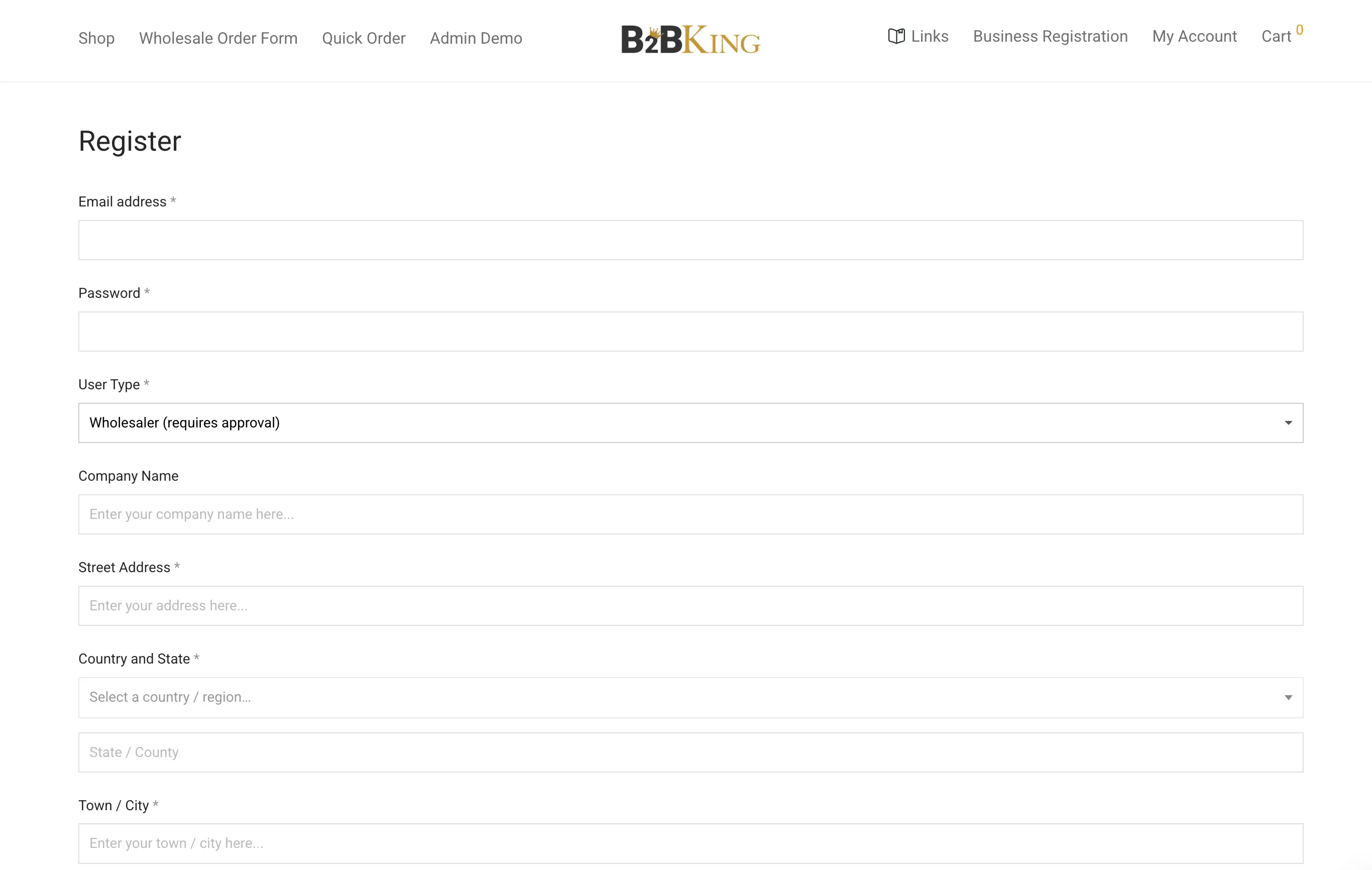
Approval can be set to automatic, where the new account is activated immediately, or manual, where a store administrator reviews each registration before granting access. With manual approval enabled, customers cannot log in or see wholesale pricing until the account is approved, which gives you a built-in gate against competitors, individuals fishing for wholesale rates, or accounts that do not match your buyer profile.
Once registration is in place, the next decision is what unauthenticated visitors are allowed to see. B2BKing provides several guest access restriction modes that can be combined or applied to specific products and categories.
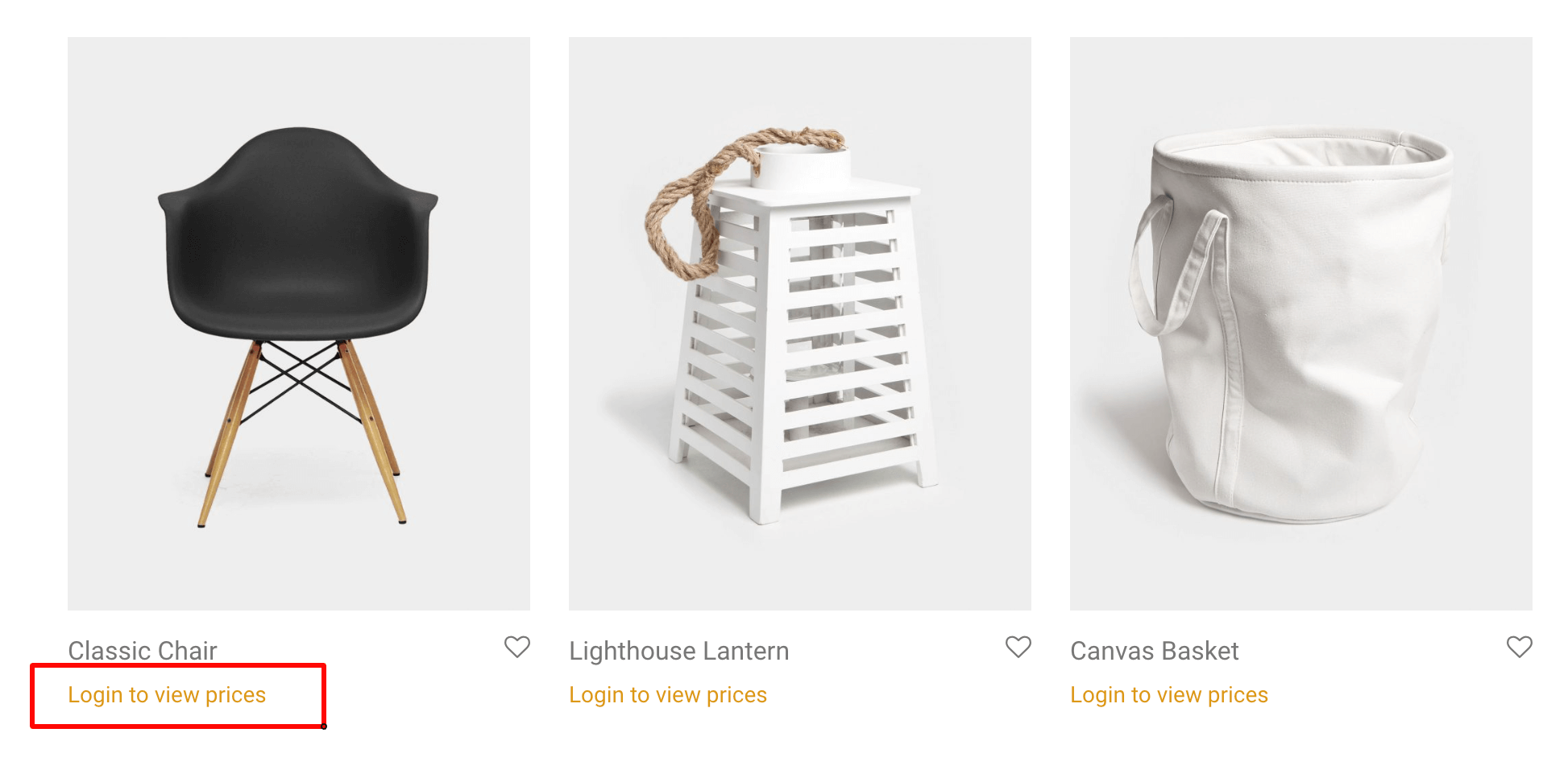
The most common configuration is to hide prices from logged-out users. Products remain visible and indexable for SEO, but prices are replaced with a "Log in to view price" message or a quote request button. A stricter configuration hides the entire shop until the visitor logs in, which is appropriate for closed wholesale operations, distributors who only sell to verified resellers, or members-only catalogs.
A third option replaces the standard add-to-cart flow with a quote request. Instead of buying directly, the visitor builds a list of items and submits it for a quote. This works well for products where pricing depends on volume, freight, or custom configuration, and where a fixed price would be misleading.
These restrictions are not limited to logged-out users. Any of them can be applied per user group, which means you can show different visibility states to retail customers, approved wholesale buyers, distributors, and internal staff, all on the same site.
Once a user is logged in and approved, pricing can adapt to who they are. B2BKing supports two complementary approaches.
The first is direct: on each product page in the WordPress admin, you can set specific prices for specific user groups. A "Wholesale" group might see a flat 30 percent off, while a "Distributor" group sees 45 percent off. This works well for stores with a small number of clearly defined customer tiers.
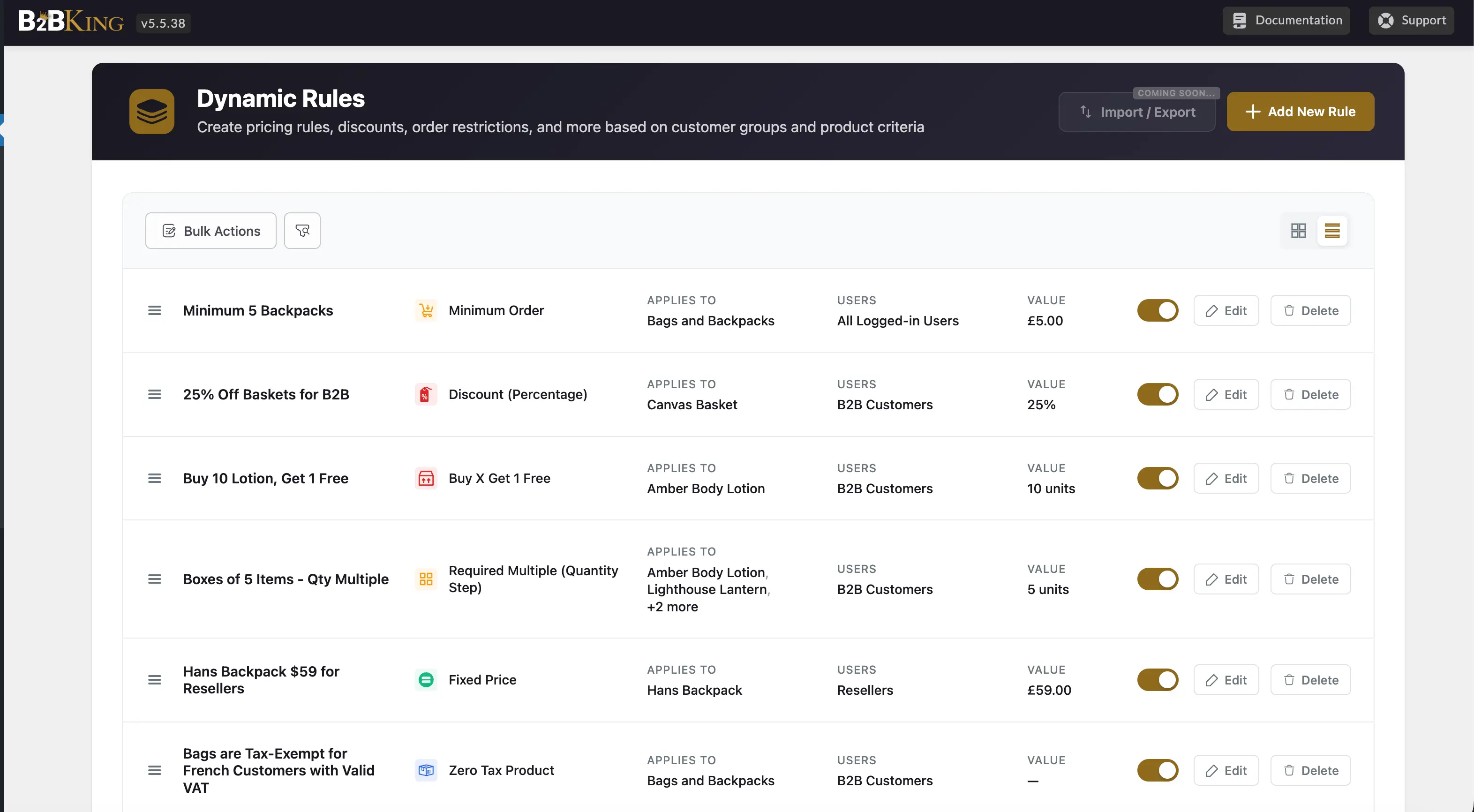
The second is the dynamic rules engine, which scales much further. Rules can target users individually or by group, and they can apply to specific products, categories, or tags. The available rule types include percentage discounts, fixed prices, fixed amount discounts, "buy X get Y free" promotions, and rules that override the default behavior for a given combination of user and product. Rules can also be created and managed through the REST API, which is useful when pricing data lives in an ERP system and needs to flow into the storefront automatically.
One discount mechanism worth highlighting on its own is tiered pricing, where the unit price drops as the quantity ordered increases. A typical configuration might price an item at $10 per unit up to 9 pieces, $9 per unit between 10 and 19, and $8 per unit at 20 or more.
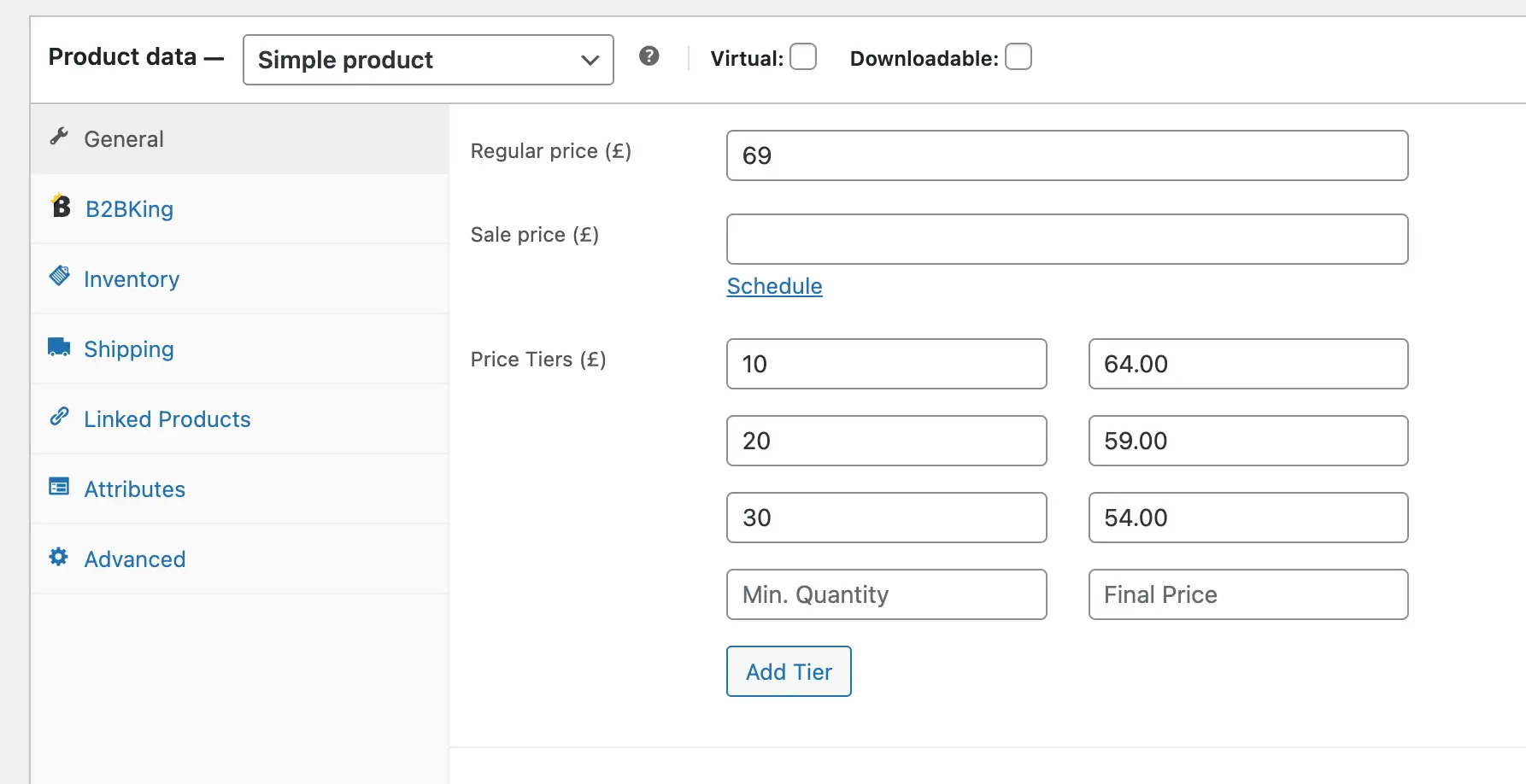
This mirrors how wholesale economics work. Production and fulfillment costs per unit fall at higher volumes, and tiered pricing passes some of that saving back to the buyer in a structured way. It also creates a natural incentive to consolidate orders or move up to the next bracket, which often results in larger average order values without any sales effort on the merchant side.
Tiered pricing is ideal for volume discounts and is the primary mechanism through which bulk pricing can be set and incentivised. B2BKing renders tiers as a frontend pricing table on the product page so the buyer can see at a glance what the next bracket looks like. Tiers can be set per product, per group, or globally, and they combine with the rest of the discount system rather than replacing it.
A retail buyer typically adds one or two items to the cart. A wholesale buyer might be filling a quarterly purchase order across fifty SKUs. Loading those products one at a time through the standard product page flow is slow and frustrating, so B2BKing adds several tools that compress the process.
The wholesale order form is a single page that lists all available products in a searchable, filterable table with quantity inputs next to each item. The buyer can scroll, search by name or SKU, set quantities for many products at once, and add the entire batch to the cart in one action. For stores with hundreds or thousands of SKUs, this is often the primary ordering interface for repeat customers.
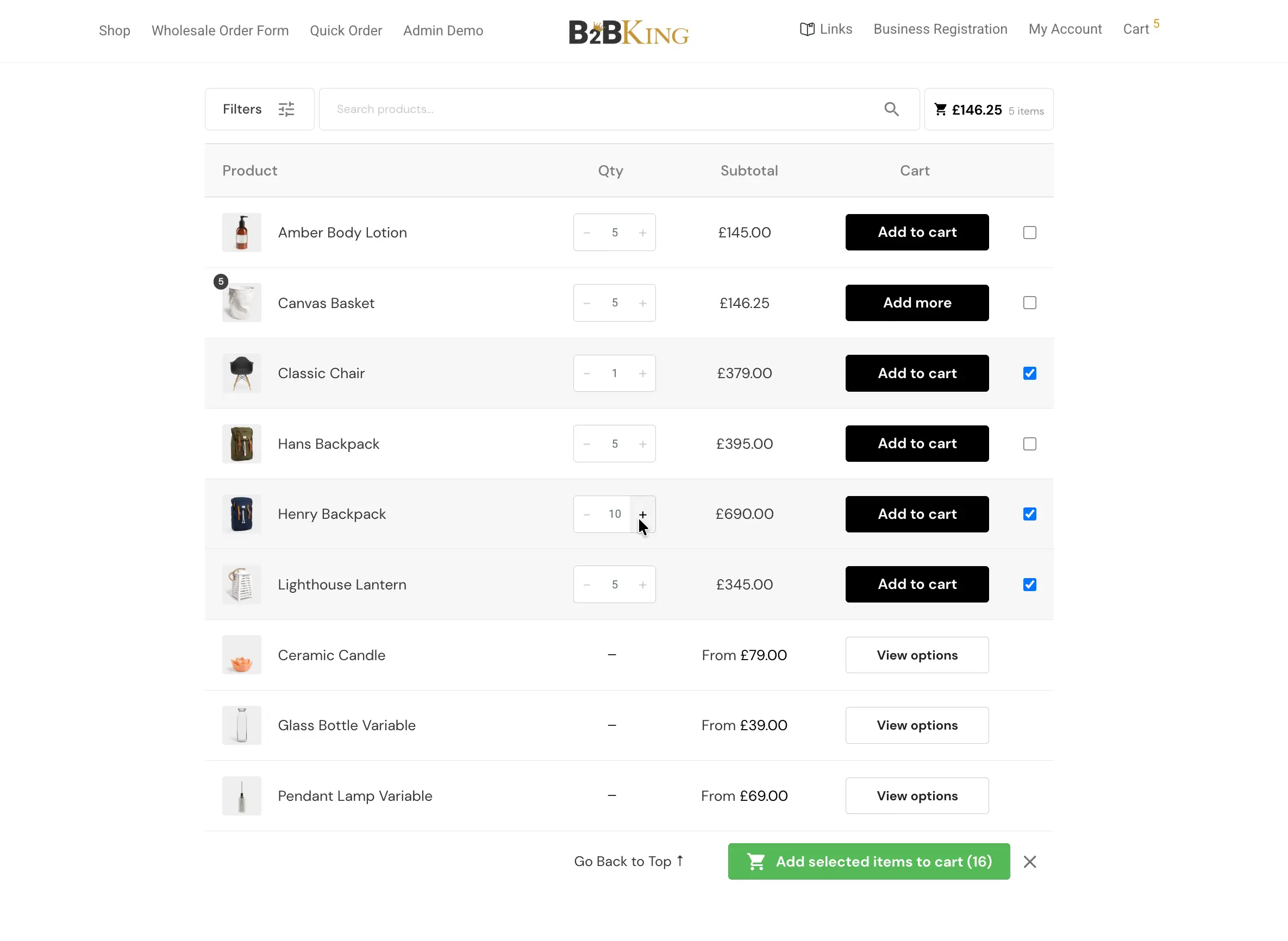
For variable products, a similar interface is available directly on the single product page. Instead of selecting one variation at a time, the buyer sees a matrix of all variations, for example sizes and colors, and can enter quantities for each combination simultaneously. An apparel wholesaler ordering a full size run across three colors can do it on one screen.
A CSV upload feature is also available. The buyer prepares a file with SKUs and quantities, uploads it, and the cart is populated automatically. This is the fastest path for large or recurring orders, and it works particularly well when the buyer maintains their own inventory system and exports purchase orders directly.
The cart is where B2C and B2B diverge again. In retail, every customer typically sees the same payment and shipping options. In wholesale, available methods often depend on the relationship between the buyer and the seller.
B2BKing lets you control which payment and shipping methods are visible per user or per user group. A new account, still on its first few orders, might be limited to credit card or PayPal where the seller has chargeback protection. An established account with a multi-year history might also see wire transfer, purchase order, or net-30 invoice payment.
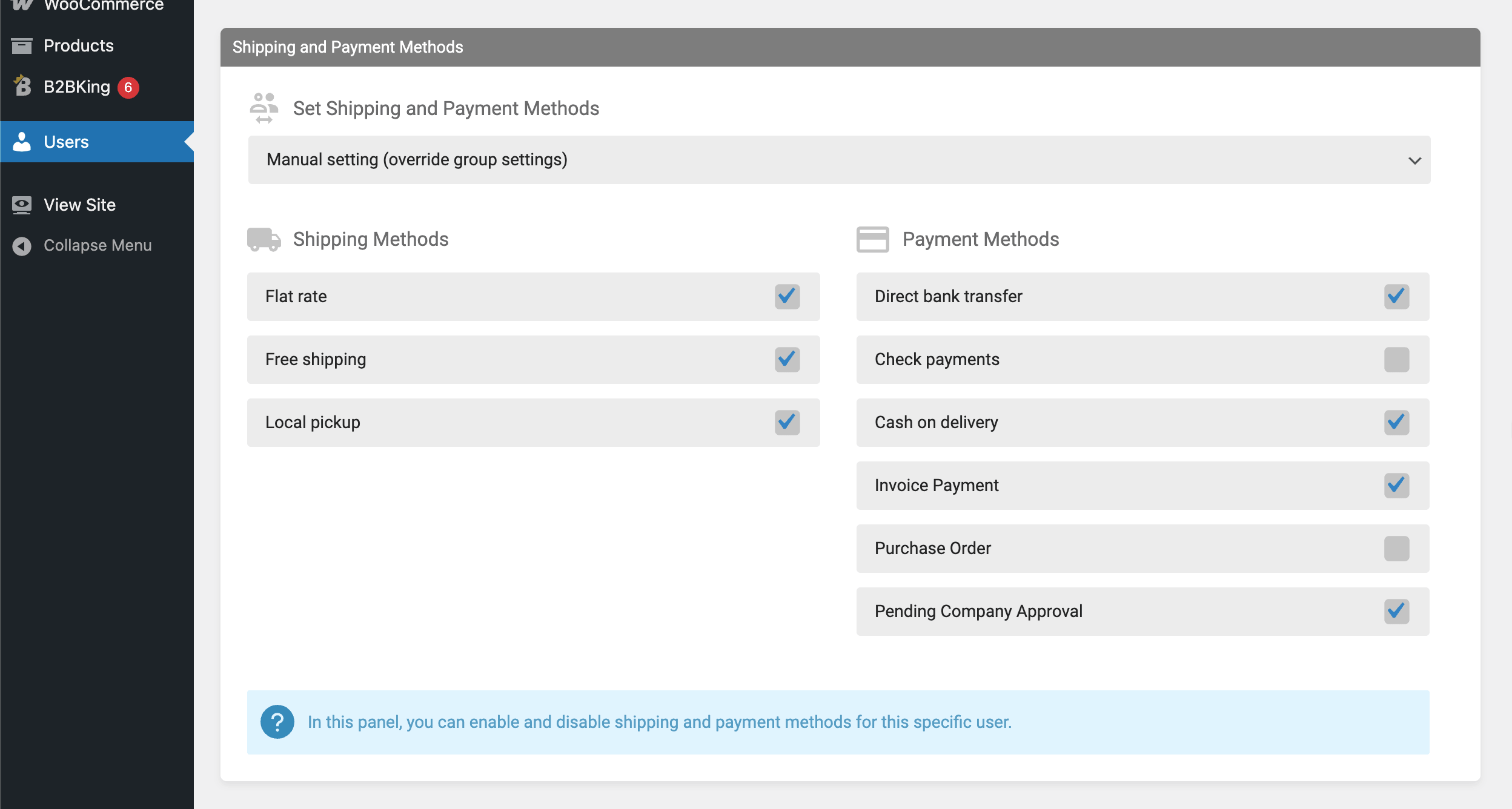
The same pattern applies to shipping. Trusted accounts might see expedited freight options that are hidden from casual buyers. Free shipping rules can also be set per group. A common configuration is to offer free shipping above a threshold to all wholesale buyers, but apply a lower threshold to a top-tier group as part of their account benefits.
On top of visibility, the available methods themselves can be modified. A payment method surcharge can be applied to cover processing fees or risk. PayPal at a 4 percent surcharge, for example, transparently passes the processor cost to the buyer who chose it. A wire transfer discount of 1 or 2 percent works the other way, rewarding buyers for using a low-cost, low-risk payment method that improves your cash flow.
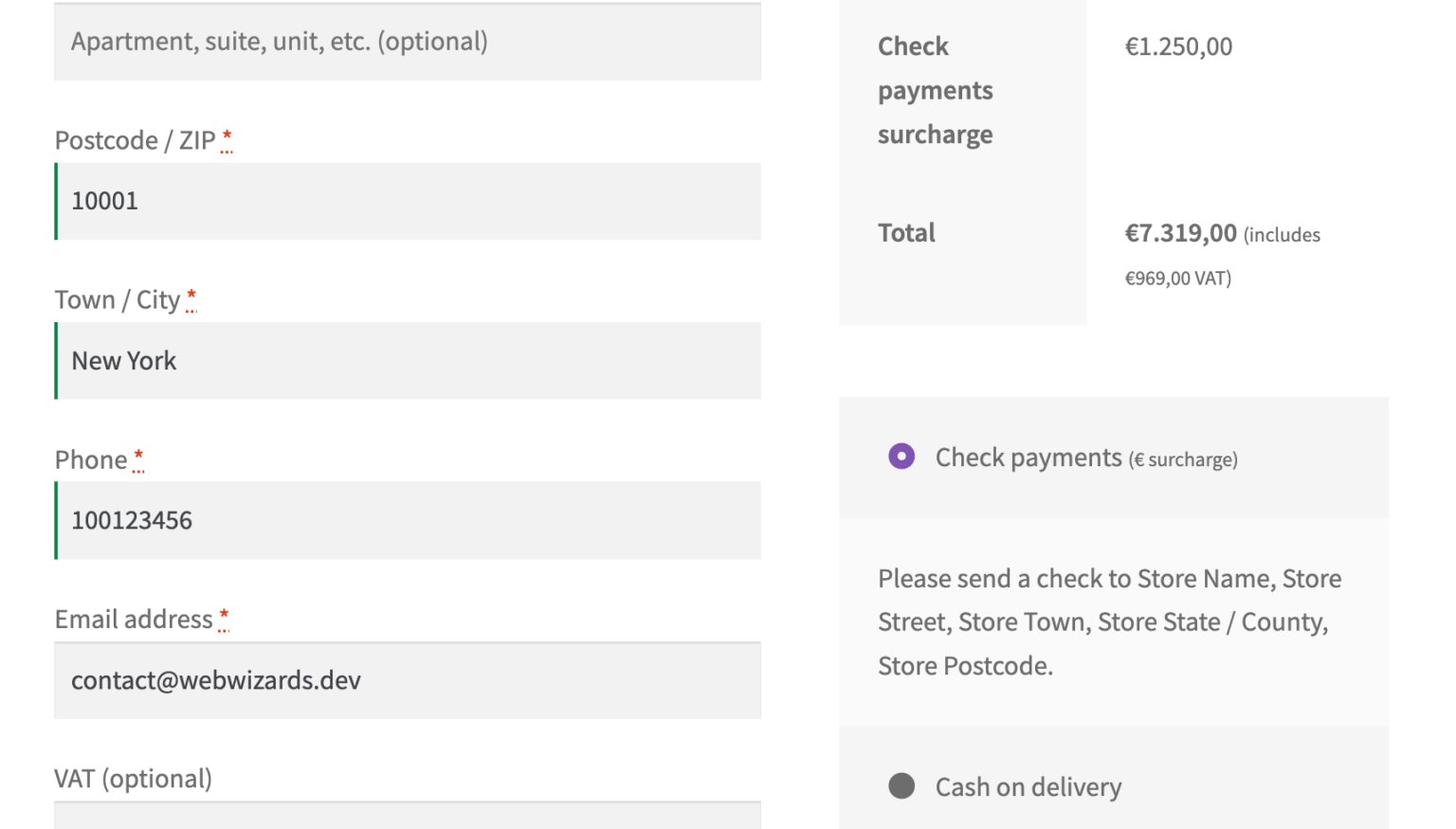
These kind of discounts and surcharges are the perfect example of how B2BKing works not just as a single plugin, but as a complete wholesale suite: features integrate and add to one another, rather than acting as separate modules.
Method conflicts can also be configured around specific products. If you sell oversized items, you can prevent letter mail or small parcel shipping from being selected when those items are in the cart. If a product cannot legally be paid for with a particular method, that method can be disabled automatically when the product is present. These rules run silently at the cart and checkout stage and prevent invalid combinations from being submitted in the first place.
Beyond pricing, the catalog itself can vary by user group. This is useful when different segments of your buyer base should see different versions of your product range.
A typical setup uses three tiers. Tier 1 sees a basic catalog of standard, in-stock products. Tier 2 adds a wider range, perhaps including premium lines or larger pack sizes. Tier 3, reserved for top accounts, sees the full catalog including new products before launch, special order items, and items currently on backorder that are not yet visible to anyone else.
Visibility can be applied at the product level or at the category level, which makes it easy to maintain. Adding a new product to a category that is already restricted means the product inherits the restriction without any extra configuration.
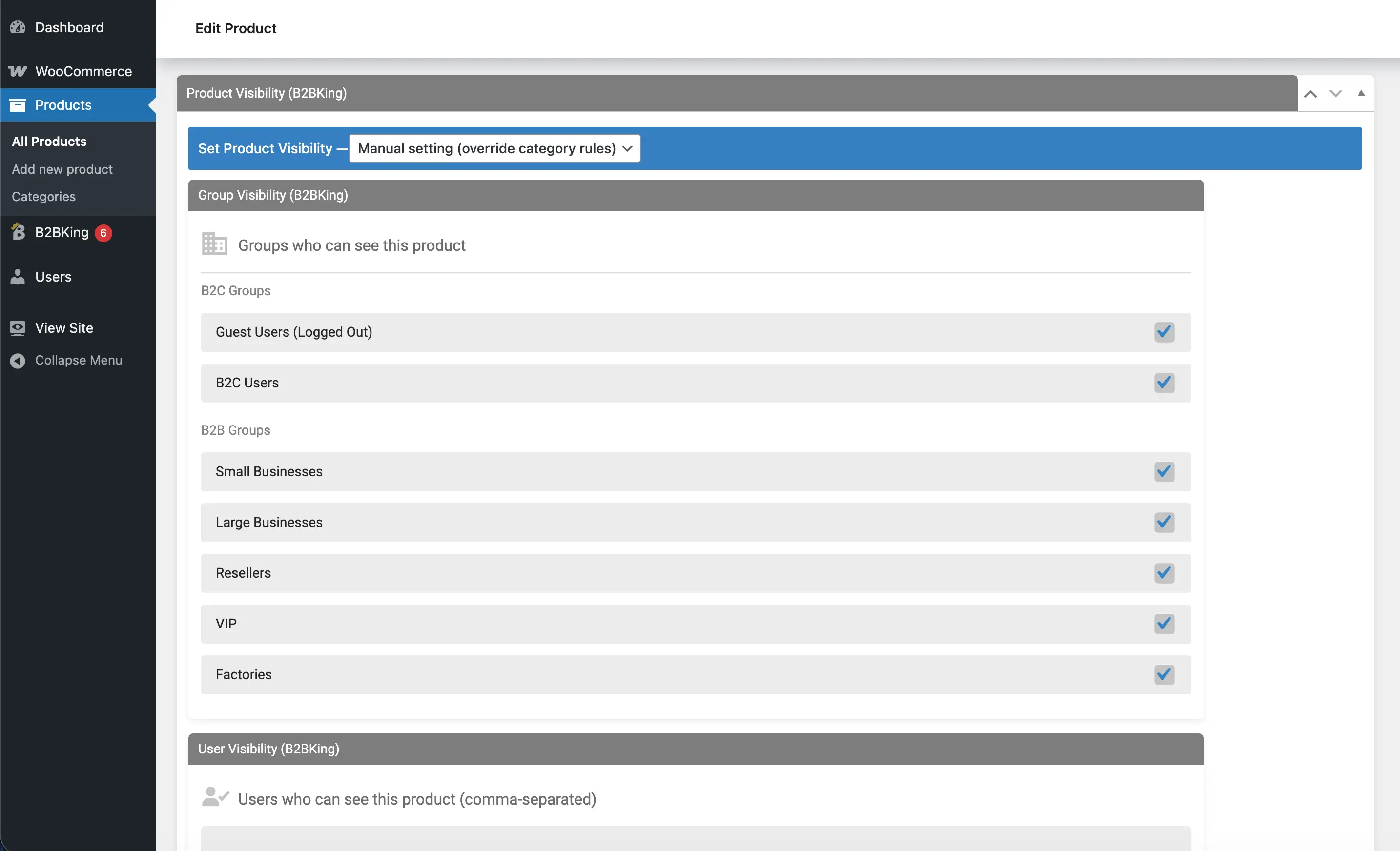
This same mechanism is also useful for managing exclusivity agreements. If a particular distributor has exclusive rights to a product line in their region, that line can be hidden from everyone else without removing it from the store.
Wholesale buying is heavily repeat-oriented. The same buyer often orders similar items week after week or month after month, and any friction in that loop adds up over a year.
B2BKing adds a simple reorder button to past orders. One click adds the entire previous order back to the cart, ready to be reviewed and submitted. For buyers who place near-identical orders on a regular cycle, this turns a multi-minute task into a few seconds.
Purchase lists go a step further. A buyer can save any combination of products and quantities as a named list, then load that list into the cart whenever needed. A restaurant ordering its standard weekly grocery items, or a workshop ordering its standard kit of consumables, can build a list once and reuse it indefinitely. Multiple lists can be saved per account, which is helpful when the same buyer manages orders for different departments or projects.
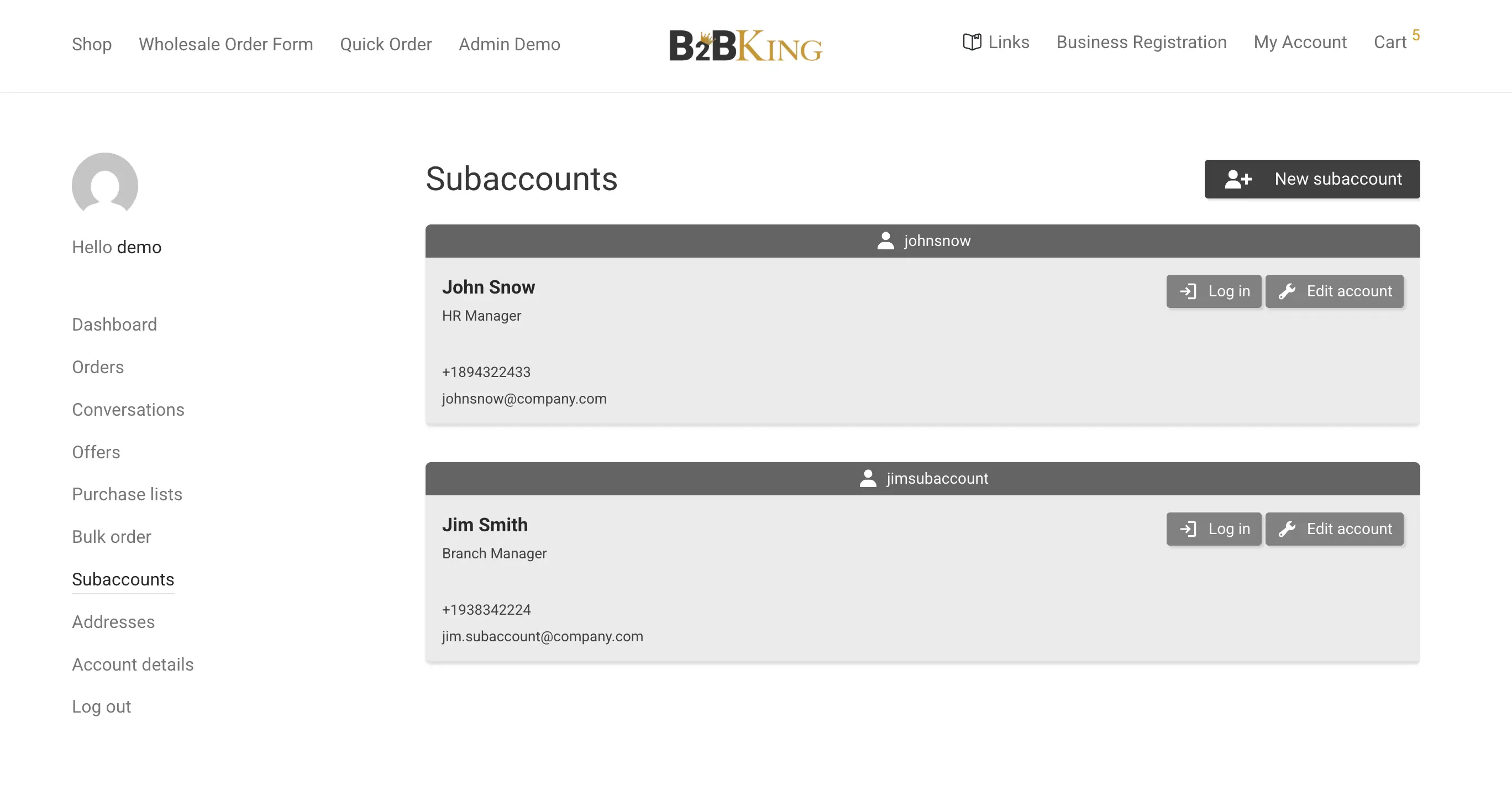
A real wholesale customer is rarely a single person. It is usually a company with several employees who are authorized to place orders, sometimes across multiple locations.
B2BKing supports this through subaccounts. The main account holder, typically a purchasing manager or owner, can create additional logins for employees or branch locations under the same company account. Each subaccount has its own credentials and can have its own shipping address, which is particularly useful for multi-location businesses where each branch needs orders shipped to its own dock.
A permissions system controls what each subaccount can do. Some subaccounts might be limited to placing orders, while others can also view invoices, manage purchase lists, or update company details. All orders, regardless of which subaccount placed them, roll up to the parent company for billing and reporting purposes. This mirrors the structure that wholesale buyers already use internally and avoids the awkward workaround of sharing a single login among multiple staff members.
The company credit module allows wholesale buyers to purchase on credit and settle the balance later, in line with standard B2B trade terms. Each account can be assigned a credit limit, and orders draw against that limit until it is paid down.
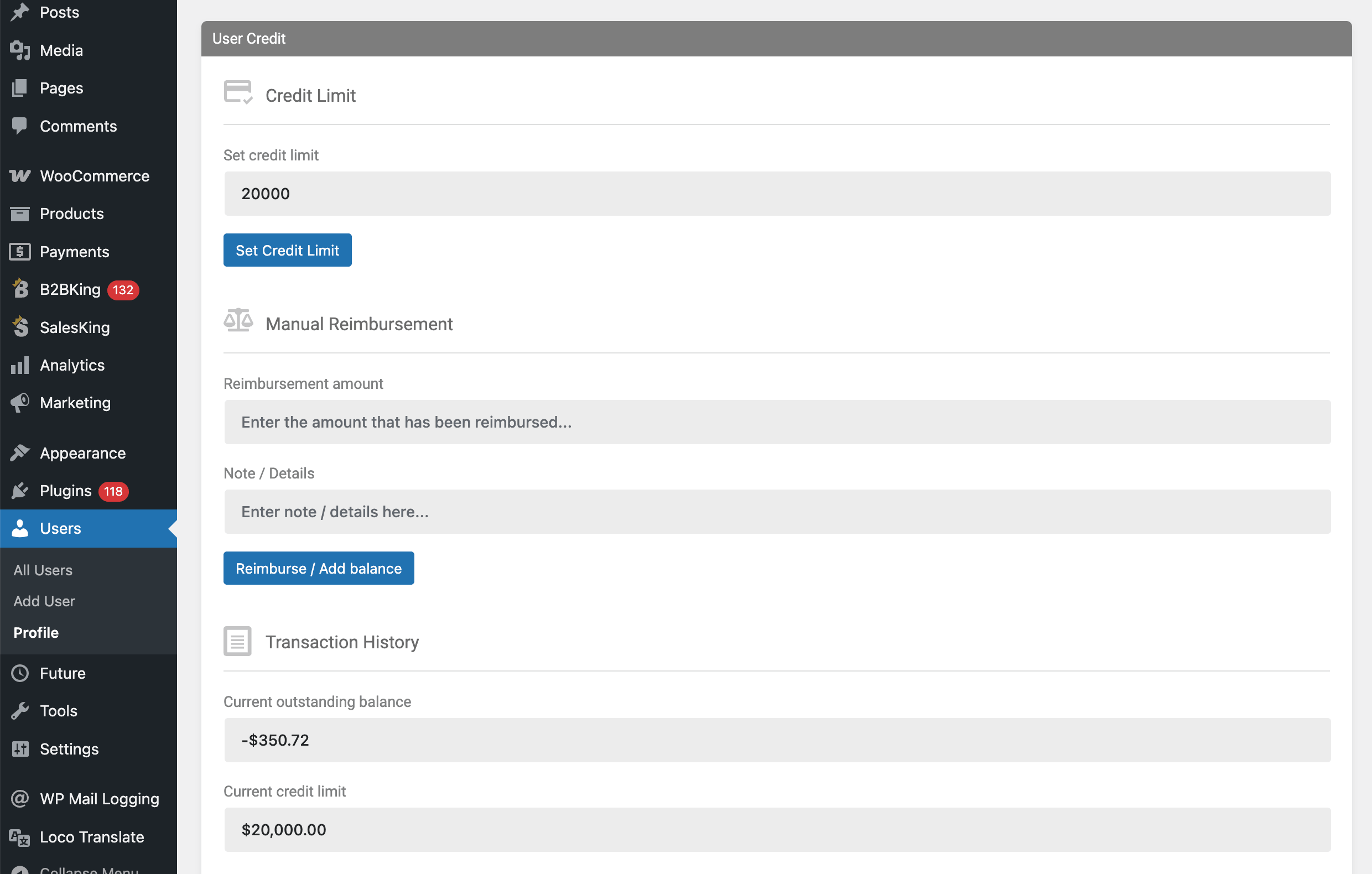
This is useful in two main scenarios. The first is straightforward credit terms, where a buyer places a large order and pays on net-30 or net-60 terms rather than upfront. The second, often more practical, is order consolidation. A buyer who places many small orders across a month can settle them all together at month end, instead of running a payment for each one. This reduces transaction fees, simplifies bookkeeping on both sides, and removes a meaningful source of friction from frequent reordering.
Credit balances and recent activity are visible to the buyer in their account dashboard, which helps avoid surprises and keeps the relationship transparent.
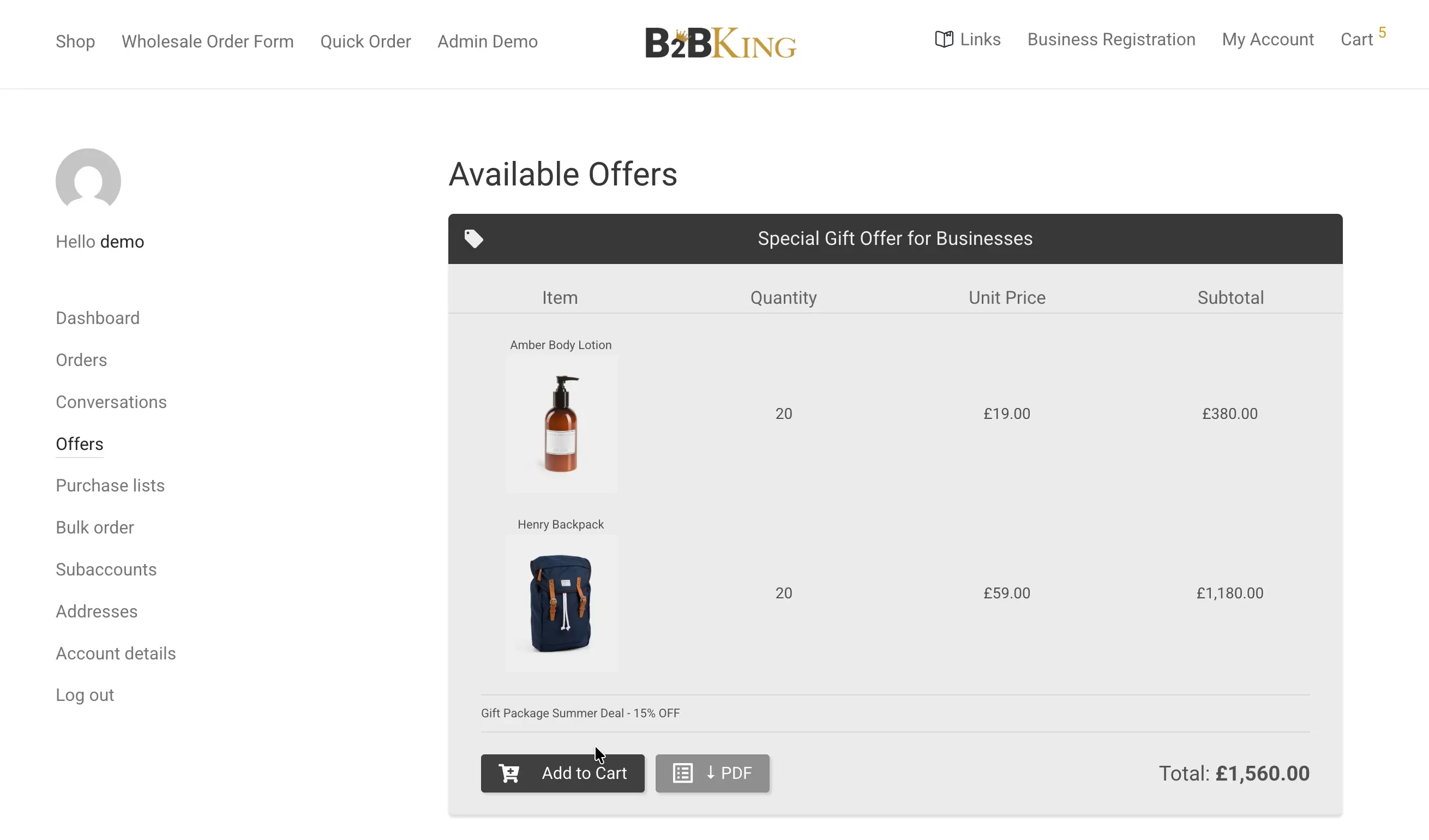
Some wholesale transactions cannot be reduced to a published price. Volume, freight, custom specifications, payment terms, and competitive context all influence what the right number is on a given day, and B2BKing includes a quote request workflow for those situations.
A buyer can build a list of products and submit it for a quote, optionally with a message describing requirements. The seller responds with an offer that includes specific products, quantities, and prices. Offers can be sent as structured proposals inside the buyer's account or exported as a PDF for use in formal procurement processes. The buyer can accept the offer and convert it directly to an order, ask follow-up questions through the built-in messaging system, or counter-propose.
This pattern, a list of items in and a custom offer out, is the digital equivalent of the back-and-forth that already happens by email and spreadsheet in most wholesale relationships. Bringing it inside the store keeps the history in one place, ties it to the customer's account, and makes it easier to convert a quote into a paid order without rekeying anything.
Each of these features is useful on its own, but the larger value comes from how they connect. A new wholesale buyer can register through a custom form, wait for approval, log in to a catalog tailored to their tier, see prices that reflect their negotiated discounts, place a large order through the bulk form, choose a payment method that suits their account history, settle on company credit, save the order as a purchase list for next time, and request a quote on items that need negotiation. None of those steps require a separate plugin, custom code, or workaround.
Building a wholesale store on WooCommerce has historically meant stitching together five or six tools, each handling part of the picture. B2BKing provides a complete wholesale suite, owning the entire process and flow end-to-end.
Get started with B2BKing today and equip your store with a powerful wholesale infrastructure!

